

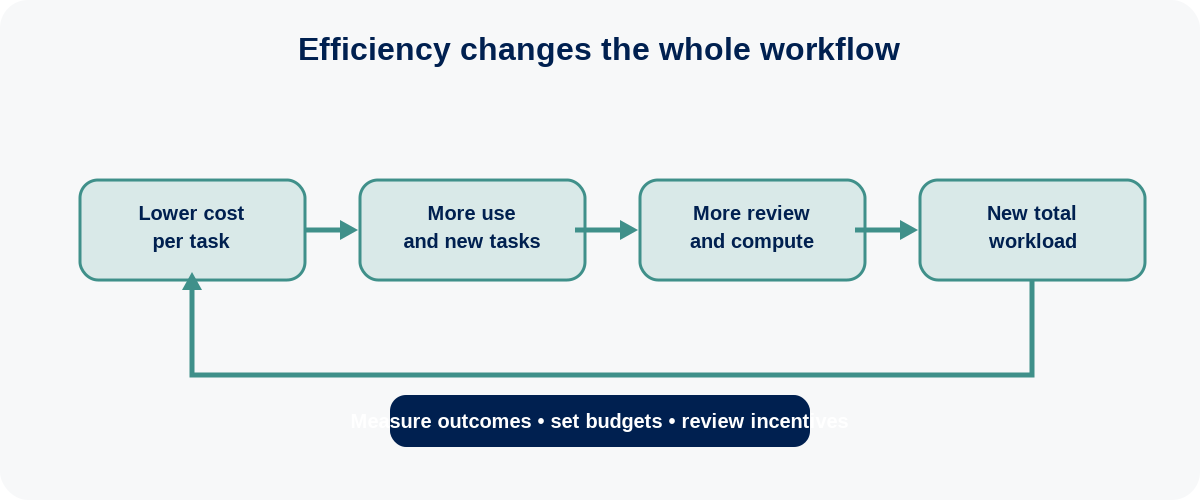
An AI system makes a task faster, cheaper, and easier to repeat. The organization then performs the task more often, adds new use cases, and creates review work around the growing output. The first efficiency gain is real, yet the total workload or resource use may rise. This is an automation paradox: local productivity can create system-level demand and complexity.
The pattern resembles the rebound effect in resource economics. William Stanley Jevons described how efficiency improvements in coal use contributed to greater total coal consumption in some contexts. Modern research uses “rebound effect” for cases where efficiency lowers the effective cost of a service and thereby increases demand. It is not a universal law that every efficiency gain backfires. Whether total use rises depends on prices, constraints, demand, substitutes, and policy.
How AI efficiency can expand the work
Suppose a team uses an assistant to draft product descriptions in minutes instead of hours. Lower production cost may prompt leaders to publish more variants, personalize them for more audiences, or refresh them more frequently. The generation step is faster, but legal review, factual checking, localization, measurement, and exception handling also grow. Total work may move from writing to governance and quality control.
In software, code completion can increase the amount of code produced. That may help teams deliver features, but it can also expand review, testing, security analysis, and maintenance obligations. If incentives reward output volume, the tool can accelerate low-value work. If the bottleneck is approval or integration, faster drafting alone may not improve end-to-end throughput.
There may also be induced demand. When a customer-support response becomes cheap, a company may offer support across more channels or for more use cases. The additional access can be valuable. But teams must observe whether accuracy, user experience, and escalation capacity keep pace with volume.
Map the reinforcing loops
Draw a causal loop around the workflow. AI lowers cost per unit; lower cost encourages more usage; more usage creates more data and expectations; increased expectations further expand deployment. This reinforcing loop can create benefits, but it can also strain review, infrastructure, attention, and trust. A balancing loop appears when quality problems, energy costs, or user fatigue trigger limits and controls.
Measure the whole system, not just time saved in the automated step. Track total task volume, downstream review minutes, error correction, compute and energy use, rework, customer outcomes, and the work displaced to other roles. Compare before and after over a period long enough to capture behavioral changes. If use increases, determine whether that represents valuable new activity or low-value churn.
Keep efficiency gains connected to outcomes
Set an explicit operating objective. A team may want shorter time to resolve an issue, more accurate decisions, broader access, or lower cost. Those goals can conflict. Define quality thresholds and escalation paths alongside throughput targets. Keep a human review loop for decisions where errors have high consequences, and sample automated outputs to estimate failure rates.
Use capacity or budget controls when unconstrained adoption could create unsustainable costs. Limit generation to high-value cases, route simple requests to cheaper processes, or use rate limits to protect shared infrastructure. These boundaries make tradeoffs visible instead of allowing demand to expand silently.
Review incentives. If employees are measured on volume, AI may increase volume without improving value. Reward outcomes and learning: defects prevented, decisions improved, time returned to customers or staff, and new risks detected early. Include affected workers in redesigning the process because automation often shifts effort rather than removing it.
Questions for a responsible rollout
- Which resource or constraint becomes cheaper after automation?
- What new demand is likely to emerge when access becomes easier?
- Which downstream steps will absorb the added volume?
- How will we distinguish valuable expansion from rework and waste?
- What policy or budget guardrail can preserve the intended benefit?
The automation paradox is a prompt to look beyond the task that became faster. Efficiency can create room for more useful work, or it can amplify demand and complexity. Measure the full feedback loop and shape the conditions under which the gain is used.
For related patterns, see our guides to Shifting the Burden and unintended consequences. The planned Jevons Paradox page is not published. For a published systems view of resource sustainability, see why sustainability needs systems thinking; the external rebound-effect sources provide the direct technical context.
Primary references: the UK government’s review of industrial energy and resource efficiency rebound effects and Germany’s Federal Environment Agency overview of rebound effects.
Use a causal model before making a forecast
When a team says AI will “save 30 percent,” ask what exactly is being counted. Is it operator time per draft, cost per completed case, or total labor across review and correction? A unit-efficiency estimate can be directionally useful, but it does not predict system-wide use by itself. Map the likely response of customers, managers, and adjacent teams to the lower cost.
Separate direct rebound from broader expansion. Direct rebound occurs when cheaper service leads the same users to consume more of it. Indirect rebound occurs when savings are spent on other resource-intensive activities. In organizations, an analogous pattern may be that faster analysis frees capacity for more projects, which may be valuable or may stretch review teams. Track which mechanism is happening instead of labeling every increase “Jevons paradox.”
Compare scenarios. A conservative case assumes demand stays stable; a growth case assumes new use cases emerge; a constraint case adds review capacity or a budget cap. Estimate compute, energy, oversight, and error costs for each. These are planning scenarios, not precise predictions, and should be revised with measured adoption data.
Protect the value of the saved time
Efficiency produces a benefit only if the released capacity is used toward an outcome that matters or returned to people. Decide in advance whether the goal is lower costs, shorter waits, higher quality, or more access. If headcount remains fixed while task volume doubles, employees may experience greater workload rather than a productivity gain. Include workers in choosing how the benefit is distributed.
Review the system after rollout. If usage grows faster than expected, check whether quality and safety controls still work. If demand remains low, investigate whether the tool solves a real problem or introduces friction. The deployment should be adjusted based on evidence rather than defended because the pilot looked impressive.
Watch for bottleneck migration
Automation often moves a bottleneck instead of eliminating it. When drafting becomes faster, review may become the constraint. When basic support questions are automated, complex cases may arrive with more frustration and less context. When code generation increases, integration testing and maintenance may dominate. Map the process end to end and ask where work accumulates after each change.
Use queue metrics and worker feedback to find hidden costs. Count rework and corrections, not just generated units. Track whether specialists are spending more time reviewing low-quality output or resolving exceptions. If the new system pushes work onto a group with less authority or visibility, productivity measures may improve while system health declines.
Bottlenecks can also shift over time as adoption grows. A pilot with a small user group may have spare review capacity. A broad rollout may saturate that same capacity. Stage deployment, set thresholds for expansion, and monitor both quality and load before increasing access.
Make the rebound visible to leadership
Present both unit and total measures. If cost per task falls while total compute doubles, show both. If time per case falls but case volume rises enough to increase total hours, explain the difference. This prevents a local efficiency metric from being mistaken for a net system benefit.
Governance groups should review resource use alongside accuracy, labor, access, and environmental effects. A decision to accept higher volume can still be sensible if it serves a meaningful need, but leaders should understand its consequences and fund the capacity required. Make tradeoffs explicit and revisit them when demand or risk changes.
Automation policy can include a budget, review ratio, or quality gate. These are not necessarily permanent limits; they are feedback controls. When outcomes remain strong and capacity is available, the organization can loosen them. When quality or worker burden deteriorates, it can adjust before the damage becomes difficult to reverse.
Consider rebound across the whole organization
Some rebound effects appear in places that conventional productivity dashboards do not capture. If an AI assistant generates a report quickly, managers may request more frequent reporting. If translation is cheap, teams may localize more content and create additional maintenance. If code review becomes faster, teams may merge more changes and increase the burden on operations. These expansions can create value, but their costs should be visible.
Include infrastructure and environmental measures where relevant. Model inference consumes energy and may require accelerators, cooling, and data transfer. Higher utilization can improve hardware efficiency in some cases, while expanded volume increases total demand. Measure the actual deployment rather than rely on generic estimates. Consider whether a smaller model, caching, batching, or a non-AI process can meet the need.
Demand management does not mean rejecting innovation. It means choosing what should scale. A public service may deliberately use automation to extend access to people previously underserved. In that case, more volume is a positive outcome if quality and capacity keep up. Make that objective explicit and ensure the expansion does not exclude people who need a human path.
Revisit the system boundary
Efficiency estimates often exclude external effects: energy supply, labor displacement, contractor workload, or costs shifted to customers. Set a boundary that matches the decision. If a tool changes the economics of an entire service, evaluate the service rather than one task. Invite affected groups to identify costs that internal metrics miss.
Review the boundary when deployment expands to a new function or user population. The original assumptions may no longer hold. A system that was low-risk as an internal assistant may become consequential when it influences eligibility, pricing, or access. Continuous assessment keeps the automation paradox from hiding inside a changing scope.
Example: an AI support assistant
Suppose an assistant cuts the average time to draft a response from ten minutes to two. The service team initially expects to save eight minutes per case. After launch, the organization expands support hours, adds product lines, and answers more questions. Reviewers now check a larger number of generated messages, while edge cases require more specialist attention. The total service may be better, yet total review labor could rise.
Measure outcomes at several levels: response time, resolution quality, customer satisfaction, repeat contacts, review minutes, and cost per resolved issue. Distinguish increased demand that reflects improved access from redundant interactions caused by confusing answers. If users contact support more because the assistant is wrong, the apparent activity gain is actually a failure signal.
Set a rollout threshold before expanding. For example, widen access only when sampled factual accuracy and repeat-contact rates remain within agreed limits and the review team has capacity. This creates a balancing feedback loop that can slow adoption when quality deteriorates and allow growth when performance is strong.
Decide who receives the productivity gain
Efficiency can produce more output, shorter waits, lower costs, or reduced workload. These are different benefits. Decide which one matters and how to distribute it. If the tool saves employee time, teams may choose to spend it on more complex cases, training, or reduced overtime. If the organization instead increases quotas, employees may experience the system as work intensification.
Include affected staff in process redesign and monitor their experience. Frontline workers often know where automation creates new exceptions, and they may have ideas for simpler workflows. Their feedback should influence the system, not merely become another dataset.
Make the expected rebound measurable
Before rollout, write down how the cheaper task is expected to change demand. Then compare the forecast with observed volume, downstream labor, and total resources after several weeks or months. If use expands, ask whether access improved for people who previously went without or whether teams are producing more low-value output. The same increase can represent success in one context and waste in another.
Publish the system boundary and assumptions used for the comparison. This makes efficiency claims easier to review and prevents teams from choosing only the metric that improved.
