

A vision-language model can answer a question about a photograph, match an image to a caption, or connect visual evidence with written instructions. These abilities do not come from adding “eyes” to a text model in a simple way. Vision-language models (VLMs) are systems that learn relationships between visual inputs and language, using architectures and training objectives that connect different kinds of representations.
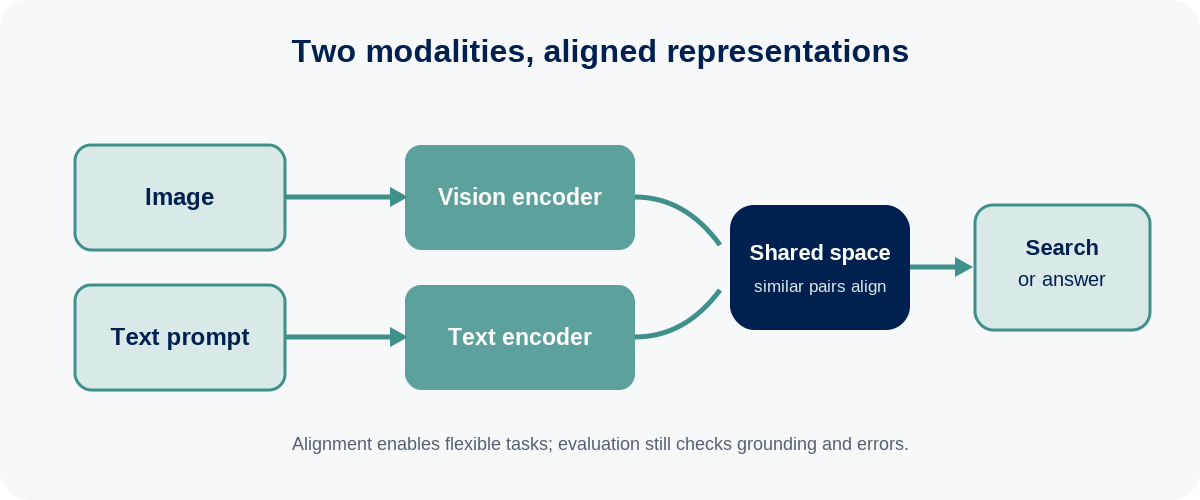
The family is broad. Some models align image and text embeddings for retrieval or classification. Others feed image features into a language model so it can produce descriptions or answer questions. GPT-4V and Gemini are examples of user-facing multimodal systems, but their full implementations are not identical or completely public. CLIP is a well-documented research example that helps explain one important design pattern.
CLIP: align representations through paired examples
CLIP was trained on image-text pairs. An image encoder maps a picture to a vector, while a text encoder maps its caption to another vector. Contrastive training encourages the matching image and caption to have similar representations and mismatched pairs to be farther apart. After training, a user can describe candidate categories in natural language and compare those text representations with an image.
This enables zero-shot classification: the model can rank labels it was not specifically fine-tuned to recognize. It is useful for flexible search, clustering, and first-pass labeling. It does not mean the model understands every phrase or can reliably identify every object. Results depend on training data, prompt wording, image quality, and whether the task resembles the training distribution.
From alignment to visual conversation
A conversational VLM typically combines an image encoder with a language model. A connector or projection maps visual features into a form the language model can use. Some systems process patches or regions at different resolutions; others use crops, tiling, or learned visual tokens. The language model then predicts a response conditioned on both visual features and the text prompt.
Training often has several stages. First, image-text pretraining establishes broad associations. Then instruction tuning teaches the model to answer questions, follow conversational directions, and describe visual content. Human feedback or preference training may refine style and refusal behavior. The deployed product adds image preprocessing, safety filters, context limits, and user interface choices. Evaluating only the neural network misses this surrounding system.
Consider a warehouse assistant asked whether a safety sign is visible. Its answer may depend on camera angle, resolution, glare, sign language, and whether a small patch was included in the resized image. A fluent answer can still be wrong. The system should surface uncertainty, request another view when needed, and avoid making high-impact decisions from a single image.
Failure modes are systemic
Visual hallucination occurs when generated text asserts details unsupported by the image. Bias can enter through imbalanced image-text data or label conventions. OCR may fail on small text, unusual fonts, or low contrast. Counting, spatial relations, fine-grained attributes, and temporal reasoning can also be unreliable. A model may describe a plausible scene rather than the actual one.
Test the full pipeline with representative images, not just benchmark samples. Include lighting and camera conditions, demographic variation where appropriate, adversarial or ambiguous examples, and cases where the correct action is to abstain. Measure grounded accuracy, calibration, latency, privacy exposure, and error severity. For accessibility use, ask people who rely on descriptions to evaluate whether errors are consequential.
Choose an architecture by the task
For image search across a large collection, embedding alignment may be cheaper and easier to operate than a generative model. For question answering over charts or documents, a larger multimodal model may be needed, but OCR or layout extraction can sometimes offer more control. For safety-critical inspection, combine model suggestions with deterministic checks and human review. Do not select a general chat model simply because it accepts images.
- Define the image tasks and unacceptable errors before selecting a model.
- Keep representative evaluation data separate from tuning examples.
- Record preprocessing, resolution, prompt, model version, and output policy.
- Provide abstention and escalation paths where evidence is weak.
- Re-evaluate after changes to the encoder, prompt, camera, or deployment context.
VLMs connect visual and linguistic signals, but the connection is learned statistically. Their useful behavior emerges from data, architecture, training, and deployment conditions together. Thinking in terms of the whole pipeline leads to better design than treating a model’s answer as a direct reading of reality.
For background on neural network connections, see our network guide. The planned Computer Vision destination is not available as a published page; this article links the closest published neural-network overview.
Primary sources: the CLIP research paper and the GPT-4V system card.
Understand the visual input path
An image usually does not enter a language model as a single, human-readable object. The application may resize it, divide it into patches, create crops, or encode multiple frames. High-resolution inputs can exceed context or compute limits, so a system may discard detail before the model begins answering. This matters for small labels, distant objects, medical images, and charts with dense text.
Preprocessing is part of the model’s behavior. Store the original image securely when permitted, record transformations, and test the exact image path used in production. If users can upload several images, clarify whether the model compares them or describes each separately. If the system cannot resolve a detail, a useful response should say so and request a closer image instead of filling in a plausible answer.
Evaluate grounding, not fluency
Build a test set with explicit visual evidence and expected answers. Include cases with no answer in the image, ambiguous framing, occlusion, text, charts, and misleading context in the prompt. Ask human reviewers to mark which claims are supported by pixels and which are inferred. A response can be grammatically polished while getting the central evidence wrong.
For retrieval tasks, measure whether the correct image appears near the top of results across diverse descriptions. For question answering, measure factual accuracy, unsupported-claim rate, abstention quality, and performance by image conditions. Keep a separate evaluation set so prompt examples do not leak into the score. Re-run after changing resolution limits, encoder, connector, or language model.
Privacy also spans the system. Image metadata can contain location and device details. A face or document may be sensitive even after an account name is removed. Set retention periods, restrict access, and clarify whether uploaded images are used to improve the model. For workplace or public-camera deployments, consider consent and the risks to people who did not choose to interact with the system.
Choose when a VLM is the right tool
Before deploying a VLM, compare it with narrower options. OCR plus a rules engine can be more reliable for extracting a fixed invoice field. An image classifier may be easier to test for a stable category set. A multimodal assistant may be appropriate when users need flexible questions across varied images. The broader the task, the more important it becomes to define unacceptable errors and how the system handles uncertainty.
Human review is not a magic safety layer. Reviewers may be rushed, may trust fluent responses, or may lack access to the source image. Design the interface so reviewers can inspect evidence, correct the model, and signal uncertainty. Track how often they override the system and whether those overrides cluster around particular image types or groups.
When a VLM is connected to tools, image interpretation can lead to actions: opening a ticket, rejecting a claim, or controlling equipment. Put authorization and confirmation outside the model. Validate structured outputs, limit tool permissions, and create a reversible path for consequential decisions. The model should not be allowed to turn an uncertain visual guess into an irreversible action.
Build governance into the data lifecycle
Training and evaluation images should have documented provenance and permitted use. Remove unnecessary metadata, protect sensitive images, and define retention schedules. If images include people, evaluate consent, biometric sensitivity, and the consequences of misidentification. A model’s ability to describe an image does not establish a right to collect or use it.
Monitor for distribution shift. A model trained mostly on daylight images may degrade at night; a chart assistant may fail after a visual redesign. Set review triggers based on error rates and product changes. Keep a rollback version available, and retain enough context to reproduce a reported failure without preserving data longer than necessary.
Use benchmarks carefully
Public VLM benchmarks offer comparisons, but they can become familiar to models through training data or repeated tuning. A benchmark may also emphasize short answers, common objects, or clean images while real use includes clutter, poor lighting, specialized terminology, and multi-step questions. Use benchmarks as one signal, then build a private evaluation suite based on the actual workflow.
Keep test examples diverse and governed. For a product catalog, include unseen categories and near-duplicate items. For document analysis, include handwriting, tables, and pages with missing sections. For assistive descriptions, include user-defined priorities such as navigation, safety, or visual context. Define how a wrong answer is classified so reviewers can distinguish minor wording differences from harmful misinterpretations.
When human review is involved, measure reviewer workload and disagreement. If the task requires sustained attention to many model outputs, fatigue may reduce the quality of oversight. Rotate tasks, provide clear evidence views, and allow reviewers to flag cases outside their expertise.
Communicate uncertainty to users
Confidence is difficult to communicate because model probabilities may not be calibrated. Avoid a decorative percentage unless it has been evaluated for the specific task. More useful signals can identify what the model observed, which parts remain unclear, and what follow-up input would improve the answer. For consequential use, route uncertain cases to an appropriate human specialist.
Document known limits in the product and training materials. Users should know whether an answer is based on pixels, OCR, retrieved metadata, or a combination. Clear provenance helps them detect when a response relies on context that may not apply.
Think beyond still images
Some multimodal systems accept short video, sequences of frames, or mixed audio and image inputs. A video question may require temporal reasoning: what changed, which event came first, or whether an object entered a scene. Sampling frames can miss brief events; audio can add context but may also introduce speaker-identification and privacy concerns. Evaluate the actual temporal pipeline rather than assuming that image performance extends to video.
Applications that analyze medical or industrial imagery need domain-specific validation. A general VLM may describe visible shapes but fail to interpret them under specialist standards. Use certified or clinically validated methods where required, and keep qualified professionals responsible for decisions. A confident general-purpose answer should not be treated as expert diagnosis.
For public-facing services, provide an appeal or correction path. If a VLM mislabels a product or fails to describe an accessibility feature, users should be able to report the problem and receive a response. Aggregating such corrections can reveal recurring data or design gaps.
Document system boundaries
Write down what the model sees, what it can retrieve, which tools it can call, and what actions are gated by a human. This boundary helps security and product teams review prompt injection, hidden instructions in images, and sensitive content exposure. A picture can contain text designed to manipulate a model, so treat image-derived instructions as untrusted input.
Apply the same principle to outputs. Validate whether generated text contains unsupported sensitive inferences, and prevent an image answer from granting access or making a high-stakes decision by itself. Clear boundaries make a VLM easier to test and explain to users.
Build a deployment boundary that matches the risk
For a low-risk image search tool, a VLM can suggest likely matches while leaving selection to the user. For an insurance claim, a model might help locate relevant damage evidence, but a human decision-maker should review the original image and policy. For machinery control, the model should not directly actuate equipment based on an unverified scene description. Authorization, confidence handling, and reversibility should reflect the consequence of error.
Consider adversarial inputs. An image can contain hidden or visible text that attempts to override instructions, or a manipulated crop can emphasize a misleading feature. Treat any instructions extracted from user-supplied imagery as data, not trusted control. Separate content interpretation from system policy, and validate outputs before passing them to tools.
Use staged rollout with a shadow period. Compare model responses with current human decisions without changing the outcome, then examine disagreement and error severity. If the model will change user-facing results, deploy to a small group, monitor the review queue, and keep a clear rollback path. Changes to preprocessing or camera hardware can shift performance even when the model itself is unchanged.
Make the product boundary legible
Explain that the system is interpreting an image and may be wrong. Show which image or region supports an answer where possible. Provide controls to replace the image, crop it, or request a human review. Avoid interface language that frames a prediction as a verified fact. The user should understand what evidence the system had and what it did with that evidence.
